Get the most for every item.
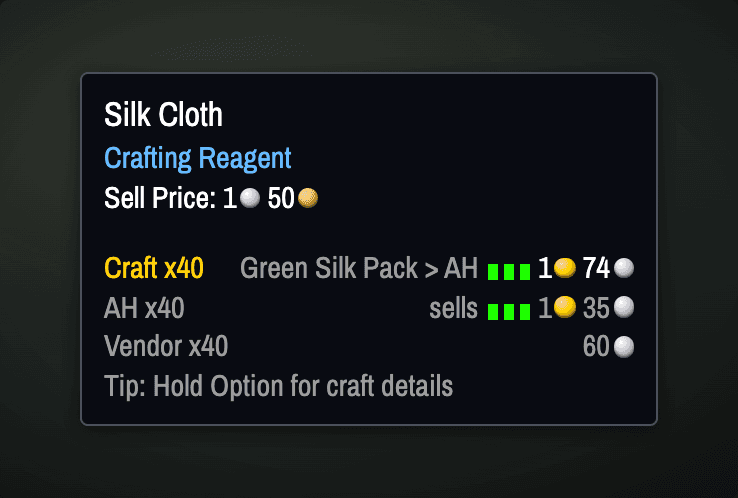
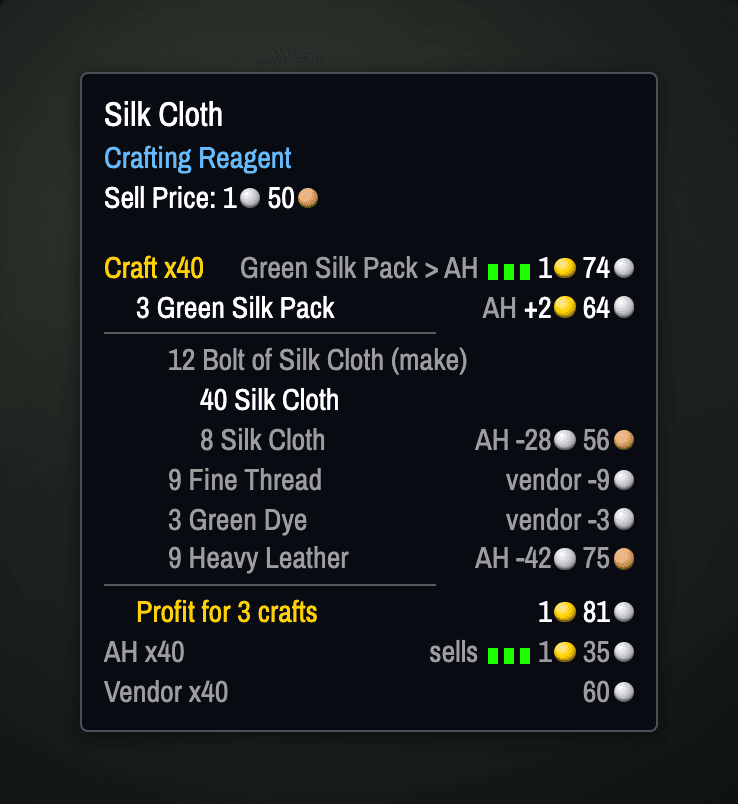
Hover any item to see the most gold you can get from it: crafted, on the auction house, disenchanted or from a vendor. The best choice lights up in gold. On CurseForge and Wago. Your prices fill in as players on your server scan.
What you'll see
One line per option, best first. If a price isn't known yet, it's left out.
Vendor
What a vendor pays. The sure thing.
Auction house
What it actually sells for on your server, after the AH cut, and how fast it moves.
Disenchant
What the enchanting mats are worth, for gear you can disenchant. Not an enchanter? Make an enchanting bank alt!
Craft
What it's worth crafted, using recipes your characters already know, minus the other mats. Sold to a vendor or on the AH, whichever pays more.
Goldmind only sends you to the AH when an item is worth the trouble and actually sells, and only suggests a craft when it clearly pays more. You set how much more gold the AH or a craft has to pay before it's worth it.
Where the prices come from
Open the auction house and the addon notes what's listed. The sync app shares your scan, and you get back prices from every player on your server, refreshed every 30 minutes. Type /reload to see them. The more players sync, the fresher everyone's prices.
No sync app? The tooltip uses your own last scan.
What it never does
- It never plays for you: no posting, buying, bidding, crafting, looting or key presses.
- The addon can't connect to the internet; WoW doesn't allow it. It only talks to the sync app, which does the uploading.
- The sync app never uploads your chat, friends, guild or other players' names.
Get the addon
Pick one. CurseForge and Wago also keep it up to date for you.
- Open
CurseForge
Installs and stays updated with the CurseForge app.
- Open
Wago
Installs and stays updated with the Wago app.
- Download
The zip
For installing by hand.
- Get it from CurseForge, Wago or the zip.
- Start or restart the game.
- Open the auction house for about ten seconds. With the sync app running, your scan uploads when you type
/reloador log out. - New prices arrive every 30 minutes. Type
/reloadto see them.
Unzip the download so that Goldmind is a folder inside:
World of Warcraft/Then start or restart the game.
Stuck? Ask on Discord.
Keep your prices fresh.
The sync app runs quietly in the background. It shares your scans, and your tooltip gets prices from everyone on your server.